top of page


PERIPHERAL IVs AND URINARY CATHETERS
Timertag Pro
Discover the workflow.
Getting Started
To start, tap any smartphone on the Timertag label (or scan with the phone's camera) and click the link. Tap on the smartphone screen to select either emergency peripheral IV, routine peripheral IV or urinary catheter, and activate. The dwell time will be displayed for 30 days, along with language-agnostic patient information about their medical consumable and a link to written patient information in 18 different languages, with German and Japanese to be added soon (all translations are ISO17100, performed and checked by two humans. No machine translations).

For peripheral IVs, apply
on the extension tubing only.

Tap "Activate" to
start timing.

Browser language is automatically
selected. Tap to confirm/choose.

For urinary catheters, apply
on drainage tube only.

Tap or scan the Timertag to
display the current dwell time.

View written patient information
in your preferred language.
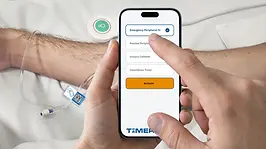
Tap or scan the label, then select
the consumable you have placed.

Tap the information button to see
patient information in 20 languages.
bottom of page