
Peripheral IV
Know how long a line has been in, and whether it went in under emergency conditions, without hunting through notes.
Goes on
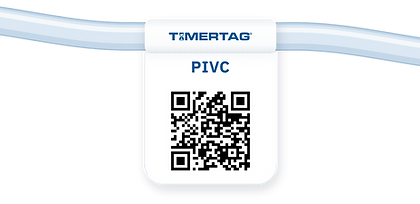
The extension set. The flag label folds around the tubing and sticks to itself, with a QR code at each end so it reads from either side.
At activation
Choose routine or emergency. An emergency insertion is flagged on every scan after that.
Every scan shows
Time in place and the date and time it started.
Patient guidance
A Patient information button opens plain-language guidance in the patient's own language.
Into the EHR
A GS1 DataMatrix your barcode scanner reads into the record.

Urinary catheter
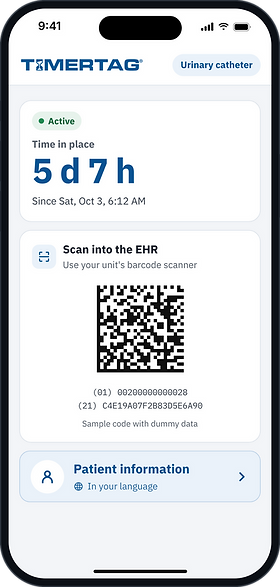
See how many days a catheter has been in at a glance, on rounds or at handover.
Goes on
The drainage tubing. A flag label cut for drainage tubing folds around it and sticks to itself, readable from either side.
At activation
One tap starts the clock.
Every scan shows
Time in place and the date and time it started.
Patient guidance
A Patient information button opens catheter guidance in the patient's own language.
Into the EHR
A GS1 DataMatrix your barcode scanner reads into the record.

Dressing
The same scan, on a label made for the surface of a dressing.
Goes on
The fabric border of the dressing. A small square label with a pattern-printed adhesive that lets moisture wick away, so it stays put without getting in the way.
At activation
One tap starts the clock.
Every scan shows
Time since the dressing went on, and the date and time.
Patient guidance
A Patient information button opens dressing guidance in the patient's own language.
Into the EHR
A GS1 DataMatrix your barcode scanner reads into the record.


IV admin set
A countdown to the next set change, chosen when the set goes up.
Goes on
The administration set tubing, with the same fold-over flag label as the PIVC.
At activation
Pick the interval: 1, 2, 4, 6, 8, 10, 12, 24, 48, 72 or 96 hours, or 7 days.
Every scan shows
Time left and when it's due. At zero, it shows zero.
Into the EHR
A GS1 DataMatrix your barcode scanner reads into the record.


Compare all four
Peripheral IV
Urinary catheter
Dressing
IV admin set
Goes on
Extension set, folded flag label
Drainage tubing, folded flag label
Fabric border, small square label
Set tubing, folded flag label
At activation
Routine or emergency
One tap
One tap
Choose 1 h to 7 days
Every scan shows
Time in place
Time in place
Time in place
Countdown to change
Patient guidance
Yes
Yes
Yes
No
Into the EHR
GS1 DataMatrix
GS1 DataMatrix
GS1 DataMatrix
GS1 DataMatrix
Read with
Any phone camera. No app, no accounts, no patient data.